Development Setup
Monolith End to End Setup
To test notifications with the Notifications Sending Service, you must run all the services and workers necessary for end to end.
Update Monolith .env.development.local file
Ensure that your .env.development.local file has the following:
NOTIFICATIONS_SIDEKIQ=true
Running Notification Services
There are two ways to run notification services locally. The first is using the Procfile.notifications script in the monolith and the second is to run the services from the notifications repo.
Procfile.notifications
If you are running this locally (not in the RDE), you will have to ensure that the Enable host networking setting is enabled (this is assuming you are using Docker Desktop for Mac). The setting is located in Resources > Network. If you can't find this, you may have to update your Docker Desktop to the latest version.
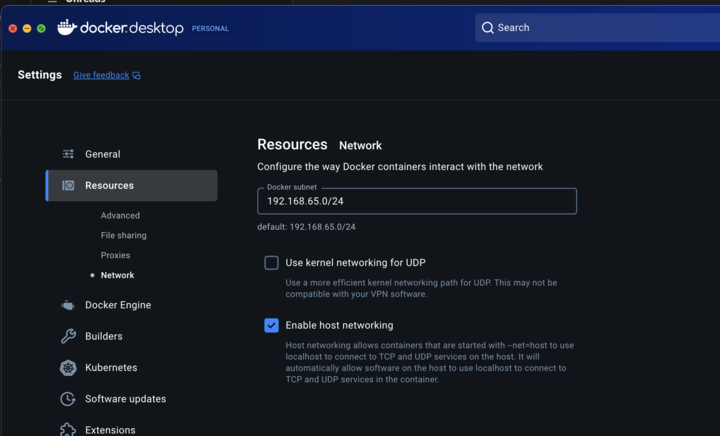
Then you can use foreman to run the Procfile from the monolith repo:
# ensure all the monolith datastores are running
./bin/comp db up -d

# start notifications
foreman start -f Procfile.notifications
The Procfile will run the following:
- Notifications sidekiq worker
- Mailgun and firebase inbox workers
- Notification Go services and workers
Running directly from Notifications Repo.
If you want to run the go services directly, be sure to read through the README and then run:
./scripts/start-with-monolith-db.sh
Testing notifications
Once the setup is done, you can test your notifications via a product flow or you can log into the app as an admin and go to /admin/notifications_admin.
We also have articles on how to test specific channels: