Offline Notifications
What is an Offline Notification
An offline notification is a non-transactional notification. It's not triggered from within the monolith, but rather an offline job, like a dag.
Use Cases
- Data-intensive notifications
- Offline notifications can use BigQuery which provides access to more data stores and can take more time without interfering with the user experience.
- Digest notifications
- This includes any notification that needs to gather objects or events of interest over a time range.
Offline Notification Examples
| Notification Config | DAG | |
|---|---|---|
| unread_inbox_message_daily_digest | unread_inbox_message_daily_digest_notifications | TODO: Add email screenshot |
How does this work?
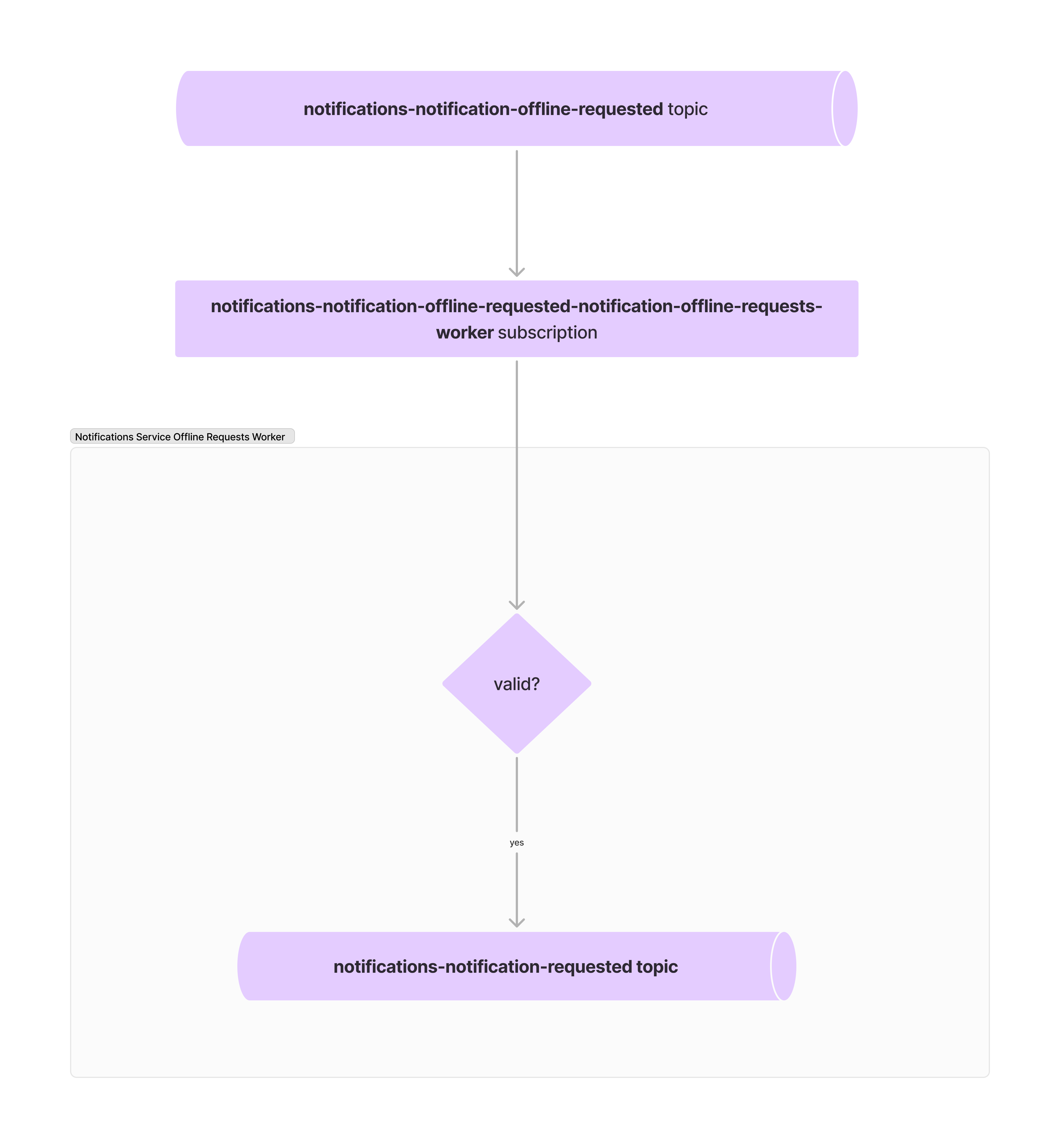
- A JSON-formatted pub/sub message representing an offline notification request gets published to the
notifications-notification-offline-requestedtopic - Our Notifications Service Offline Requests Worker processes messages from this topic via the
notifications-notification-offline-requested-notification-offline-requests-workersubscription - The worker validates that the request is for an existing notification and includes the required attributes (as defined in the notification config)
- The worker publishes this request to the
notifications-notification-requestedtopic. At which point it gets merged into the queue of online notification requests
How can a message be published to the offline request topic?
A DAG can be used to publish JSON-formatted pub/sub messages to the notifications-notification-offline-requested topic. We're working on automating this, but for now the following steps and resources should suffice.
- Create a table in the
notifications_data_serviceBQ dataset that can temporarily store notification requests - Build a DAG consisting of three steps:
- Gather and store all the data required for the offline notification in BQ
- Create a JSON file in GCS with the gathered data
- Publish each row of the GCS file to
notifications-notification-offline-requested
Create a table in the notifications_data_service BQ dataset
| Table Name | notification_name_notification_requests |
| Table Schema | TODO: See https://github.com/joinhandshake/terraform/pull/4289 |
Note: notification_name should match the name as defined by the notification's config file
The Notifications Team uses terraform to change our notifications_data_service dataset in BQ. Here's an example on how you can add a new BQ table to the notifications_data_service dataset. Notification BQ table schemas are defined here.
Build a DAG
Gather Data
| Example Operator | Example Query |
This step will be custom to the offline notification being created. The outcome should be that data gets populated in the notification_name_notification_requests BQ table.
Create a JSON File in GCS
| Example Operator | Reusable Query |
The reusable query above should be all that's needed to bundle your data into a GCS JSON file. Information about expected query params can be found below:
| Param | Description | |
|---|---|---|
| notification_name | Required | The name of the requested notification. |
| notification_version | Required | The version of the requested notification. |
| project_id | Required | Set as Cloud().gcp_project_id. Allows the dag to run in multiple GCP projects and store data in the appropriate folder for that project. |
| include_attributes | Required | Set as True if BQ table has an attributes field, otherwise set as False |
| include_metadata | Required | Set as True if BQ table has a metadata field, otherwise set as False |
| include_email_address | Required | Set as True if BQ table has an email_address field, otherwise set as False |
| channels_filter | Optional | List of proto Channel enum names to restrict delivery to (e.g. ["CHANNEL_IN_APP"], ["CHANNEL_PUSH", "CHANNEL_EMAIL"]). Omit or pass an empty list to send to all channels enabled in the config. See Channels filter below. |
Channels filter
Each notification config declares which channels (email, push, in-app) are enabled. By default a send fans out to every enabled channel that the recipient also has enabled in their notification preferences.
The optional channels_filter field on the offline request restricts that fan-out to a subset of channels at request time. This avoids having to fork a notification config into multiple versions just to vary which channels fire.
- Provide a list of proto
Channelenum names:"CHANNEL_EMAIL","CHANNEL_PUSH","CHANNEL_IN_APP". - Omitting the field, or passing an empty list, is treated as "no filter" — all enabled channels are used.
- A channel listed in the filter that is not enabled in the config is invalid; the worker will surface an error.
In a BigQuery export query, emit it as a typed array column so the empty-default case is well-typed:
ARRAY<STRING>['CHANNEL_PUSH', 'CHANNEL_EMAIL'] AS channels_filter
protojson.Unmarshal on the worker side decodes the JSON string array into the proto Channel enum slice on OfflineRequested.
A worked example: airflow/notifications/personal_email_collection_notifications.py runs two parallel branches off the same v5 config — one with channels_filter=["CHANNEL_IN_APP"], the other with ["CHANNEL_PUSH", "CHANNEL_EMAIL"].
Publish JSON File Contents
| Example Operator |
This operator can be copy/pasted, but update the job_name to be specific to your notification. For instance, in the dag example it is publish_unread_inbox_message_daily_digest_to_pubsub